Blog
Separating Transactional and Marketing Email Streams: Best Practice (2026)
- Engineering
- Deliverability
When to separate marketing email from receipts and password resets, and the practical steps: address, preferences, IPs, and clean lists.
When to separate marketing from transactional
If you are starting today, separate them now. Send receipts and password resets from one subdomain, and newsletters from another. You start with a clean foundation, and each kind of mail builds its own reputation from the first send. Pingram includes unlimited domains and subdomains on the free tier, and the same account allows you to send both without another vendor.
If both kinds of mail already share an address, decide from your volume and from what is happening in the inbox.
Below about 100,000 emails a month, total, you usually gain nothing by splitting domain or IP reputation. There is not enough mail for a second identity to earn its own standing. A dedicated IP is a later step: some providers will not isolate one until around 300,000 emails a month. If you are under 100,000 and password resets are reaching the inbox, keep the current setup.
Separate them if you answer yes to any of these:
- Are you above that volume? You should separate so marketing complaints don’t affect your transactional emails.
- Are critical emails landing in spam? Transactional emails in the spam folder are a reason to split, even when the monthly total is still small.
- Are you planning a large campaign? Send it from its own subdomain before the burst, so the complaints do not land on the address that sends transactional emails.
A small, quiet newsletter can stay on the transactional IP and send on that reputation. Once you expect complaints, give marketing its own domain.
Step 1: Separate the address & domain/subdomain
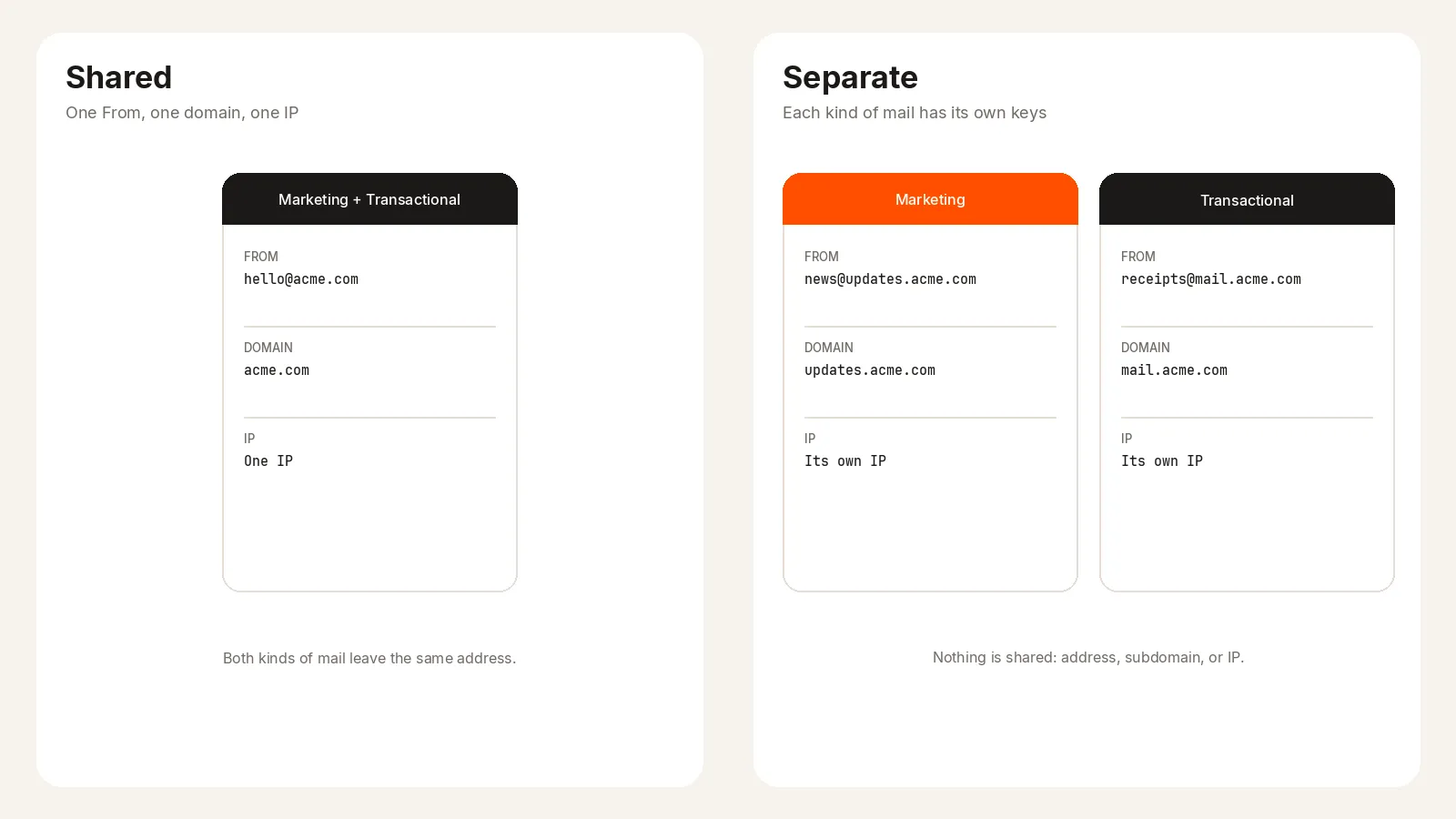
Receipts and password resets should come from a different address than newsletters and promotions. Use a different part of your domain for each, such as receipts@mail.acme.com and news@updates.acme.com. Leave your normal company address, the one your team uses in the inbox, out of both.
Marketing mail is easier to ignore and easier to report. When it shares an address with the mail people are waiting on, those reports become the reputation of the password reset too. Two addresses keep that reputation apart, and people learn which mail is which from the sender line.
Step 2: Separate subscription preferences
Someone who opts out of marketing still needs the receipt and the password reset. Store those choices apart. Leaving a newsletter should not turn off the mail their account depends on.
Go one step further inside marketing. Promotions and the newsletter are different subscriptions. A person may want the monthly letter and not the sale blast. Let them drop only the one they do not want. When the only way out is to reject every email, people use Report spam, and that hurts the address more than an unsubscribe does.
Pingram handles this automatically. Each email has its own type, such as a password reset, a newsletter, or a promotion. When someone unsubscribes, they leave that type only, and later sends of that type skip them. The receipt and every other subscription stay in place. Pingram hosts the unsubscribe page and records the choice for that type.
Step 3: Separate the IPs & warm up
The address is the name people see. The IP is the path the mail takes. At higher volume, or when you expect complaints, marketing should travel on its own IP so a rough campaign does not sit on the path your transactional emails use.
A new IP has no history. Inboxes do not trust it on the first large send. Warm it up: start with a small number of messages, then increase. The goal is a steady record of mail people accept before a big campaign goes out.
If complaints are unlikely and volume is still modest, one IP can be the better choice. Marketing then benefits from the reputation the transactional mail has already earned.
This is the part most teams should not run by hand. Pingram sets up the addresses, the IPs, and the warm-up for paid customers. If you are unsure whether to split, contact support. They will walk through the choice and put each kind of mail on the right IP.
Step 4: Clean your lists
Every Report spam counts against the address that sent it. One angry click on a newsletter is a mark on the marketing address. One angry click on a receipt is a mark on the transactional address. The aim is to make those clicks rare.
Clean both lists, not only the marketing one.
- Remove addresses that bounce. Sending again to a dead address looks careless.
- Remove anyone who reported spam, and do not add them back.
- Send marketing only to people who asked for that kind of mail. A purchased list creates reports on day one.
- Stop mailing people who never open.
Step 5: Avoid spam reports
People report spam when they cannot tell what the mail is, or when the message frustrates them.
- Name the sender for the kind of mail: “Acme Receipts” and “Acme Notifications.”
- Skip promotional phrasing such as “Congrats” and “Last chance.”
- Open with your brand, for example “Acme Updates” or “Welcome to Acme.”
- Say why they received it. At the top: “Someone requested a password reset on your Acme account.” If that does not fit there, put it in the footer: “You received this email because you opted in to promotional emails when you signed up.”
- Always put an unsubscribe in the footer. Pingram unsubscribe links add this for you. When it is missing, more people report the mail as spam.
TLDR
If you are starting now, separate marketing and transactional email before the first campaign. If you are already mixed, split when volume is high, when transactional emails hit spam, or when a large campaign is coming. Use a different address for each, keep subscription choices separate (promotions apart from the newsletter), clean both lists so Report spam stays rare, and give marketing its own IP once complaints are likely. Pingram handles the addresses, the IPs, and the warm-up for paid customers.
Common questions
01What is the best practice for separating transactional and marketing email streams?
Send from two separate domains, or two subdomains of your domain, so each stream keeps its own reputation. Marketing email generally has a lower reputation than transactional email, and a shared domain lets that reputation land on receipts and password resets. Pingram includes unlimited domains and subdomains on the free tier, and the same account sends both transactional and marketing email.
02How should you manage user email preferences?
Keep the preference data for each stream separate. Unsubscribing from marketing should leave transactional email in place. Pingram supports that because each email has its own type, such as product updates versus password reset. When someone unsubscribes, they unsubscribe from that type, not from every kind of email.
03Should marketing emails use separate software from transactional emails?
It depends on how complex the marketing requirements are. If campaigns are tied closely to data that already lives in your CRM, send the marketing email from that CRM. If the provider you already use for transactional email covers what those campaigns need, stay with it. A second product only helps if you need the features in that second product. Pingram draws both types from the same package and budget, which is usually cheaper than paying for a separate marketing tool.
04Should marketing and transactional email use separate IPs?
It depends on your volume and on the bounces and complaints you expect. If you do not expect complaints, the same IP can help marketing mail land, because it sends on the reputation of the transactional mail. If you expect the marketing mail to draw a lot of complaints, separate the IPs. Pingram offers white-glove deliverability for paid customers. If you are unsure, contact support. They can walk through the choice and set up IPs for your different domains.